Microsoft Windows 10 End of Support for Greenhouse and Nursery Businesses
Microsoft has announced the official end of support for Windows version 10.
This is a critical topic for greenhouse businesses that rely heavily on Windows 10 based PC’s or laptop computers for their employees, any local Windows 10 servers, or any other automation, printing or monitoring systems that rely on Windows 10. This article covers what you need to know about the upcoming end of support for Windows 10.
What Is the Exact End-Of-Support Date for Windows 10?
The current version for Windows 10 is 22H2, there will be no more major updates. The only thing Windows 10 will receive is Critical Updates and Patches until Oct 14th, 2025. Businesses have over a year to prepare.
How to Tell what version of Windows you have?
To find your current version of Windows there are several ways to search for it.
- Using the Search tool
On newer versions of windows you can use the search function..

Copyright Advanced Grower Solutions
Select the System Information at the top of the Summary page and it will show you the Windows OS Name and what Version the computer is running.
- Using the Start Menu.
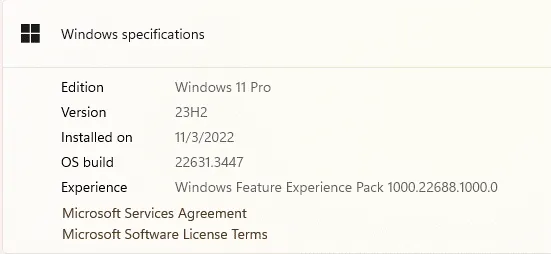
For this option select the Start Button and then choose Settings – System – About. This will show you the Windows Specifications for the computer.
How Much Will Windows 10 Updates Cost After 2025?
This is subject to change but as of April 5th, 2024, these are Microsoft’s plans.
Microsoft says an Extended Security Update (ESU) license for businesses will cost $61 per device for one year. That price will double every consecutive year, for up to three years. Businesses can purchase these licenses starting in October 2024.
Education Licenses will cost $1 per license for the first year, $2 the following year, and $4 the third year.
Microsoft has not released individual PC’s costs yet.
What Are the Security Risks Associated with Running Windows 10 After October 14, 2025?
Security Risks – Without Critical security updates, Malware, Viruses, and security loopholes will no longer be fixed with updates. Security loopholes found after the end of life of Windows 10 will not be fixed for free.
Compliance – Some security companies have regulatory requirements that require up to date software.
Compatibility Issues – Software and Hardware evolves sometimes very quickly, and the Operating System (OS) is at its core. As Hardware and Software become more advanced, out of date OS will no longer recognize these newer programs and hardware.
How Can Greenhouse Businesses Assess If Their Current Systems Are Compatible with Windows 11?
The Biggest stopping point for converting over to Windows 11 is the new security inside most new Computer Bios called TPM or Trusted Platform Module 2.0. This is a secure Crypto processor with multiple security points to make it tamper resistant, malicious software is unable to tamper with its functionality. TPM 2.0 is in a lot of new computers but not turned on, you can find the settings inside your computer BIOS on Bootup.
Windows 11 also has a lot steeper hardware requirements than all its predecessors. You can download Windows 11 and test your compatibility here.
What are some alternative options for businesses that cannot upgrade to Windows 11?
There are a few options to turn to for businesses. You can switch over to an MAC OS (Apple), but Apple and Microsoft do have some issues working together in a business application. Linux is another option, but it lacks commercial support and software interoperability.
What Specific Challenges Might Greenhouse Automation Systems Face with The Windows 10 Update?
At the end of life of Windows 10 compatibility could be the biggest issue automation could run into as the OS ages and newer hardware is installed into the network. Better hardware always requires higher-end software, as the OS Ages security gaps arise which invite software failures and potentially malicious software causing critical failures.
What Steps Can Greenhouse Businesses Take Now to Prepare for The End of Windows 10 Support?
Start preparing now, an ounce of prevention is worth a pound of cure. Download and run the Windows 11 compatibility utility, it will tell you what you are missing for Windows 11. Make a list of Critical shortcomings, then needs and finally wants on your hardware. Enlist the aid of a good IT Professional to help you through maze of do I really need it to keep my business in tip top shape. A lot of Green Industry look to watering systems, growing materials, and equipment but never glance at the computer network running everything not growing. It is a vital part of your business and requires maintenance just like the potting machine.
Find out more about the Windows 10 Life Cycle click here: https://learn.microsoft.com/en-us/lifecycle/products/windows-10-home-and-pro
Find out more about the Windows 11 Requirements/PC Health Check App: https://www.microsoft.com/en-us/windows/windows-11-specifications
Conclusion
By planning and acting early, greenhouse and nursery businesses can ensure a smooth transition and minimize disruptions to their operations after the end of Windows 10 support. If you are looking for a software partner that provides updates and support to help your business grow, contact us to find out how Advanced Grower Solutions software can help your operation.